Tag: Cardiac Device Clinic Staffing

Female black clinician thumbs up

Best Practices for Running a Cardiac Device Clinic

At a recent PrepMD Webinar a panel discussion was held to share best practices to address the common challenges on cardiac device remote monitoring programs. The panel discussion was led by Rob Lerman, MD, CMO, along with three CCDS-certificated leaders from the PrepMD Clinic Solutions Leadership Team.

Kent Seckinger, CCDS, PrepMD 4+years, cardiac device space for 20 years, working split half between the device industry for manufacturers and the other half working for a large device clinic.

Brianne Terrell, RN, CCDS, PrepMD 1 year, device clinic for about 10 years working in support of device implantation, patient consultation, perioperative device management, in-clinic follow up, and remote monitoring. 

Janet Cedric, CCDS, worked at Prepmd 4.5+ years and in the cardiac space for about 24 years. I’ve managed and started up device clinics. 

Q: Based on your years working in cardiac device clinics, can you share any advice or tips on how clinics handle the staffing requirements needed to run their remote monitoring programs? 

Brianne: I worked in a clinic of all registered nurses and our responsibilities made for very fragmented days.  We were all responsible for seeing device clinic patients in person and handling remote monitoring patients. Obviously, the patients seen in person seemed to always get the most priority. During and after COVID, we ended up having to send many of our nurses to work from home and what we found was we were able to work more efficiently when we had dedicated staff for remote monitoring. So it was really one of those aha moments.

Janet:  I’ve been fortunate enough that the clinics that I worked in had dedicated staff who were well-trained and supported, so they were all very capable of being able to recognize and manage the complex issues of cardiac devices and remote monitoring. Some clinics I’ve been in touch with decided that due to COVID staff changes and shortages they needed to move to a third party vendor to manage their remote monitoring.

Kent: As a clinic increases in patient size, so do the remote transmissions and there comes a balancing point where a limited staff, or in some cases one individual, is responsible for in-person and remote care of device patients. Having a dedicated staff for remote monitoring clearly helps as a clinic grows in size and allows the clinic to manage and improve efficiencies. The best situation to start to improve a device clinic is to be able to have that right mix of in-clinic staff versus dedicated remote staff.

Q: What would you say most clinics feel are the biggest challenges faced with running an effective and efficient remote monitoring program?

Kent: Many of the biggest efficiencies any clinic should achieve is centered around patient education. Too often a patient is sent home after device implantation with a transmitter without any education around the device, the transmitter and the importance of remote monitoring. Spending some dedicated time at the first post-op follow up visit which can take a good 30- 40 minutes is crucial.  Taking time to educate the patient and the family is so crucial. This patient communication and education should clearly explain the benefits of remote monitoring and how this will ultimately make the patient’s life safer and easier by reducing unnecessary in-office visits and hospitalizations. It also helps to explain the billing associated with remote monitoring so they are not surprised or confused. This patient communication will help reduce a lot of that hidden workload and burden on the clinic staff, including unnecessary patient-initiated transmissions or connectivity issues.

Brianne: I find that looking back 10 years ago versus today the remote monitoring population and requirements of any clinic has just exploded and these clinics are feeling the pressure of managing it all. It’s rare that we talk to a clinic that does not feel the need to have more hands on deck to manage their remote monitoring. I would say the biggest challenge most clinics face is the huge remote monitoring workload burden and figuring out the best workflow for their individual clinic.

Janet: I’d say the biggest challenge remote monitoring clinics face is not having the appropriate dedicated staff. We see a lot of benefit from clinics hiring dedicated administrative staff to help with remote monitoring. Especially when the software is integrated with EMR, there are a lot of backend tasks that can be crucial to making things more efficient. There are many times when the remote monitoring staff will need to talk to the in-clinic staff. If you have a dedicated staff for remote monitoring they will be able to identify any patient care problems earlier and get that patient into be seen by a clinician sooner and ultimately providing improved patient care.

Q:Based on your experience, do you have some advice or tips that you can recommend to those trying to start up or improve their remote monitoring program? 

Brianne: The value of a dedicated staff for remote monitoring cannot be underestimated, in addition to the importance of a thorough communication process to educate patients about remote monitoring and ensure their monitors are connected and transmitting.

Kent: If you really want to reduce your clinic workload, it’s really coming down to educating that patient from the start. The result will be fewer patients with disconnected monitors and fewer calls from disgruntled patients who don’t understand the remote monitoring billing. This patient communication is a really crucial step and sets the stage to reduce a lot of that overload, which allows clinics to operate at a much higher efficiency level.

If you are a clinic manager with questions or need help with the management of your cardiac device remote monitoring responsibilities, contact the PrepMD Clinic Solutions Leadership Team.

Medical billing and coding clinician

All Things CIED Remote Monitoring Billing – from experts at Medtronic and PrepMD

Watch Video

For Episode 4 of the PrepMD Webinar Series on remote monitoring for cardiac implantable electronic devices (CIED), Dr. Robert Lerman, PrepMD CMO spoke with Jason Clyne, Regional Economics Manager for Medtronic CRM about coding, billing, and reimbursement for cardiac rhythm management devices.


Highlights of the PrepMD and Medtronic conversation are below:

Lerman: Jason, I’m really excited to have you with us today. Can you tell us a little bit about what you do as a Regional Economics Manager?
Clyne: Within Medtronic I focus on cardiac rhythm management- the ablation side, certainly pacemakers, ICDs, and cardiac diagnostics such as Linq as well as some of our other portfolios such as Tyrex. My conversations tend to be looking upstream at some of the different tools we have in the market access space and trying to uncover what that population of patients looks like, down to the point of service or procedure- coding, coverage, and payment scenarios. I also speak to the downstream value and all the great clinical outcomes that Medtronic provides as well as the great economic outcomes that accompany those clinical outcomes.

Lerman: Thanks, Jason. So here are a few key concepts that are important. The billing and coding requirements that we’re going to review don’t tell you how often device checks can be done. It is important that those decisions are governed by medical necessity as determined by the provider. We don’t even have control over the frequency of RM transmissions,- even clinicians and 3rd party companies don’t always control the frequency of patient-initiated or alert-generated transmissions. However, we DO have control over how often and for what we bill!

Second, this webinar will focus on traditional fee-for-service Medicare requirements and reimbursement. Even within traditional Medicare, there may be local coverage decisions and different approaches taken by different Medicare Administrative Contractors – or MACs. Additionally, Medicare Advantage, Medicaid, and private payors may all have different requirements such prior authorizations. So always check with your local MAC or payor for detail and requirements for your location.

Before we get into any details, please take a look at the PrepMD and Medtronic disclaimers below1,2 Essentially, the information presented is for information only and does not constitute legal advice or recommendations. Final responsibility for billing and coding is with the provider. While we have tried very hard to provide current and accurate information, even Medicare regulations change frequently, so again please contact your Medicare contractor, other payors, reimbursement specialists, and/or legal counsel for interpretation of coding, coverage, and payment policies.

Clyne: We’re certainly going to have some great conversations but again, not providing any legal advice, and we’re not recommending any clinical practice. That’s up to you the provider at home to constitute for your patients.

Lerman: We’re going to be talking mostly about Medicare rules and regulations. Medicare is a federal health insurance program for people who are predominantly 65 years of age or older. A Medicare Administrative Contractor or MAC is a private healthcare insurer that’s actually been awarded a geographic jurisdiction to process Medicare claims for their fee for service beneficiaries. Medicare relies on a network of MACs to serve as the primary operational contact between the fee for service program and healthcare providers. The MACs have a fair amount of latitude, not only to process claims, but to establish local coverage determinations called LCDs, as well as to review claims and medical records when appropriate. Which is why when say when in doubt to consult your local MAC, that’s what we’re talking about.

Keep in mind that Medicare has a variety of payment programs with different rules and reimbursement policies. Today we are focusing on the Physician Payment program. In this program, payments are made to physicians based on the Medicare Physician Fee Schedule which is updated at least annually on January 1. If you’re working in a hospital or Ambulatory Surgical Center, there are different payments systems and reimbursements differ.

There are some basic questions that you should ask when thinking about billing for CIED monitoring:

  • What kind of devices are being monitored?
  • Where is the service being performed?
  • Should the service be billed globally or as separate technical and professional components?
  • Who is performing the technical and professional components? Are modifiers necessary?
  • What procedures are performed and what are the corresponding CPTâ codes?
  • Are the services billable based on timing requirements?

So Jason, how often should CIEDs be monitored?

Clyne: It ultimately goes back to the provider. The provider knows the medical history, the indication for the device, and what follow-up routine is the best fit for a given patient. That’s where the guidance should start. What we’ll talk about now are guidelines, not mandates, but they help develop a routine for your clinic.

CMS has put out a national coverage determination for pacemakers, but note that it hasn’t been updated since 1984. It speaks to routine and asymptomatic management, that being one device evaluation per year for single chamber pacemakers and one every six months for dual chamber devices. Place of service is not specified. Some of the Medicare Administrative Contractors have started to put in some further language to help clarify, likely because there have been a lot of changes in our therapeutics since 1984. So for example we have a local coverage determination from Novitas for pacemakers that acknowledges that for symptomatic patients, the CMS guidance for routine follow-up can be combined with either remote or in-person follow-up with a reasonable frequency when medically necessary. We certainly advise that you look at your local guidance from your local Medicare Administrative Contractor. Also from a CPT® code perspective, the CPT® codes have finite guidelines, but from a remote monitoring standpoint we’re really looking at once every 90 days, a period of time that we’re going to monitor this.

The societies provide some further guidance. HRS updated their guidelines in 2015 and there may be an eventual change to this in the future. But the guidelines speak to at least one in-office transmission per year versus remote transmissions on the pacemaker side anywhere from every 3-12 months. So again, there is some variability there and the same applies on the ICD side with every 3-6 months, so there is some leeway there but at the same time some guidance as to how these patients should be managed.

Lerman: I think it is important to reinforce that the national coverage decision from CMS on pacemakers hasn’t been updated since 1984, which we know predates the modern era of remote monitoring, and they provided no guidance on ICDs at all. So as Jason pointed out, we have to rely on some of the local MACs decisions as well as the CPT® code guidance and that from the societies. We seem to get along pretty well, but it is interesting that CMS hasn’t made a national update in quite some time. In addition to the timing requirements, which we’ll discuss in further detail, there are some additional Medicare requirements around documentation and physician supervision. Jason, can you talk about some of those?

Clyne: Device interrogation whether remote or in-person is a diagnostic test. Like any diagnostic test being performed it requires a written order. The order needs to originate from the practitioner who uses the results to treat the patient. The patient medical record needs to clearly document the practitioner’s intent that the test be performed. In addition, medical necessity documentation is important, and this will come into play later when we discuss heart failure diagnostics and implantable physiological monitoring. Patient history and indication for the device can be utilized, but then specific to the individual test, what is the reasoning for ordering the test? What findings are being sought, and what are the results of those tests and how will they be used to manage the patient’s clinical issues? Each parameter tested and the results should be maintained in the medical record.

The next question to be addressed, whether the diagnostic tests are remote or in-person interrogation, is what kind of supervision is required? Most of the time it is a technician or a nurse that is completing the interrogation, whether in-person or remote. From a remote monitoring perspective, all that is required is general supervision. General supervision occurs when the procedure is provided under the supervising practitioner’s overall direction and control, but the supervising practitioner’s presence is not required during the performance of the procedure. The supervising physician is responsible for ensuring that there is proper training for the non-physician personnel that is performing the diagnostic test and that the equipment is maintained and proper supplies are provided.

The in-person interrogation is a different story, as now there is a patient in front of us, and maybe there is an opportunity for medical intervention as needed. So now there is a need for direct supervision. That direct supervision can be provided by a physician or now, a non-physician provider (NPP) such as a nurse practitioner or PA. They don’t need to be specifically in the room with you, but they should be close by in order to perform medical intervention if needed. A question arises for a hospital-based clinic that what if the physician is in the cath lab performing a procedure? Even though they are in the same building, if they are not immediately available to provide assistance and direction, then it does not qualify as direct supervision.

Lerman:  The general supervision requirements for remote are what allows third party companies to participate in remote monitoring, because they can be done under the general supervision of the physician, who is not required to be in the same facility.

Clyne: That’s right.

Lerman: One of the things that differentiates in-person device checks from remote device checks is the concept of whether they are billed based upon global CPT® codes or individual technical and professional codes. For in-person checks, global codes exist, which encompass both the technical and professional components. If you are only reporting one of the professional or technical codes, a modifier is used. For example, if you are only billing the professional component, you would add a -26 modifier to the global code, and if you are only reporting the technical component, you would add a -TC modifier. One example of where these modifiers might be used is if an industry representative is performing the technical component of the in-person check. In that situation, the appropriate billing for the clinic or the physician is the -26 modifier for the professional component only.

On the remote side it is largely different. With one exception there are separate technical and professional CPT® codes. Third-party companies will frequently perform the technical component under general supervision, while the clinic practitioners perform the professional component of the evaluation. It is important to note that remote CPT® codes are appropriate whenever a patient is not physically at a healthcare facility to receive this service. Jason, can you help us better understand some of the details that distinguish the professional component from the technical component?

Clyne: The professional component is that physician’s interpretation of the diagnostic test performed and all findings included in a written report as well as relevant clinical issues. For in-person monitoring services it also includes all components of supervision of the diagnostic testing. The technical component can include a number of things, including the technician or nurse receiving and downloading the data and performing technical interpretation and distributing the results. The technical component includes all non-physician work performed, including the cost of administrative personnel, capital equipment and facility costs, and related malpractice expenses. One would think that the reimbursement would be heavily weighted towards the professional because that’s where a lot of the interpretation is being done, but there is a lot of work on the technical side that goes on behind the scenes.

——————————————————————————————————————————————

In part two of Remote Monitoring Billing and Coding we’ll discuss the individual remote monitoring CPT® codes, the concept and rules behind monitoring time intervals, and how dates of service variations create challenges for billing compliance.

1 PrepMD Disclaimer: PrepMD provides this information for general information purposes only. It does not constitute PrepMD makes no guarantee that the use of this information will prevent differences of opinion or viewed as instructions for selecting any particular code. Please contact your Medicare contractor, other payers, reimbursement specialists, and/or legal counsel for interpretation of coding, coverage and payment policies.

This document provides assistance for FDA approved or cleared indications.
CPT® copyright 2022 American Medical Association. All rights reserved. CPT is a registered trademark of the American Medical Association. Applicable FARS/DFARS restrictions apply to government use. Fee schedules, relative value units, conversion factors and/or related components are not assigned by the AMA, are not part of CPT, and the AMA is not recommending their use. The AMA does not directly or indirectly practice medicine or dispense medical services. The AMA assumes no liability for the data contained or not contained herein.

2 Medtronic Disclaimer: Medtronic provides this information for your convenience only. It does not constitute legal advice or a recommendation regarding clinical practice. Information provided is gathered from third-party sources and is subject to change without notice due to frequently changing laws, rules and regulations. The provider has the responsibility to determine medical necessity and to submit appropriate codes and charges for care provided. Medtronic makes no guarantee that the use of this information will prevent differences of opinion or disputes with Medicare or other payers as to the correct form of billing or the amount that will be paid to providers of service. Please contact your Medicare contractor, other payers, reimbursement specialists and/or legal counsel for interpretation of coding, coverage and payment policies. This document provides assistance for FDA approved or cleared indications. Where reimbursement is sought for use of a product that may be inconsistent with, or not expressly specified in, the FDA cleared or approved labeling (e.g., instructions for use, operator’s manual or package insert), consult with your billing advisors or payers on handling such billing issues. Some payers may have policies that make it inappropriate to submit claims for such items or related service.

CPT copyright 2021 American Medical Association. All rights reserved. CPT is a registered trademark of the American Medical Association. Applicable FARS/DFARS Restrictions Apply to Government Use. Fee schedules, relative value units, conversion factors and/or related components are not assigned by the AMA, are not part of CPT, and the AMA is not recommending their use. The AMA does not directly or i


Clinician in dark blue scrubs at computer

Cardiac Device Remote Transmission Scheduling: Work Smart, Not Hard

“Setting correct intervals, whether manual or automatic scheduling, in Boston Scientific, Medtronic Carelink, and St. Jude/Merlin/Abbott patient profiles can serve as a resource when determining the best dates for upcoming office visit device checks.”

by Amy Harris, PrepMD Lead Patient Outreach Specialist

Amy is part of the PrepMD Clinic Solutions Leadership Team, providing cardiac device remote monitoring software and services to device clinics across the U.S.

Auto-schedules, set to the correct intervals, reduce the risk of scheduling oversight, as well as billing inconsistencies for patients keeping track of their medical balances. 

In addition to billing predictability for patients, scheduling pacemaker and defibrillator remote transmissions at the standard minimum interval of 91 days increases the likelihood of obtaining four remotes per year, per patient.    

Setting intervals to 98 days to allot more time to initiate the billing process results in fewer transmissions each year per patient, and reduces clinic revenue for remote monitoring.

The same result is true for remote schedules which are skipped or “pushed out” for office visit interrogations. Setting correct intervals, whether manual or automatic scheduling, in Boston Scientific, Medtronic Carelink, and St. Jude/Merlin/Abbott patient profiles can serve as a resource when determining the best dates for upcoming office visit device checks. 

Scheduling loop recorder/ICM transmissions each 31 days is the standard minimum, however, intervals of 35 days ensure transmissions arrive on weekdays (for clinics wishing to avoid weekend billing). 

 Medtronic and Boston Scientific require a few
unique steps during the scheduling process

Patient accounts in Carelink with bedside monitors and implanted devices compatible with Smart Scheduling are represented by a symbol . This icon indicates the implanted device is capable of automatic, cycling scheduled transmissions.

The absence of this icon is noted for devices which require patient-initiated manual transmissions, such as with the Advisa, Adapta, Micra, Sensia, Revo, and Versa. 

For Medtronic Carelink, there are different scheduling options and requirements  

Single 

  • Located under the “Schedule” tab, these one-time schedules are used primarily for pacemakers or defibrillators programmed only to manually transmit. Patients are informed of future transmission date(s), and send data independently. 
  • Single, or one-time scheduling may also be utilized for any pacemaker or defibrillator which is capable of Smart Scheduling, but is opted out of automatically recurring transmissions (e.g., Monitoring physician preference, or report data/billing concerns). 
  • In some cases, both Single and Smart schedules can be used, however, it is more efficient to select one option to avoid scheduling overlap or error. 

Series

  • Located under the “Schedule” tab, compatible pacemakers or defibrillators can utilize a Series, or auto-cycled schedule. This method ensures home monitor transmissions are being sent on time, every time, and provides notification when they have failed.
  • The earliest possible transmission date is provided, and custom intervals can be selected.     
  • If a bedside monitor experiences connectivity issues, a Series set to transmit on an interval will automatically place that patient within the “Missed Transmissions”, “No Schedules”, and/or “Disconnected Monitors” category for your review. 

Summary (Loop Recorders)

  • Located under the “Overview” tab, “Summary Reports” are clinical reports generated for LINQ devices. These can be set to a one-time or recurring schedule. 
  • LINQ schedules should not be set under the “Schedule” tab. Whether one-time, or recurring transmissions, a Summary Report cannot be generated unless set up utilizing the tools provided under “Overview”  
  • Note: LINQ schedules created under “Overview”, do not populate the date of the next transmission under the dashboard column labeled, “Next Scheduled Send” (for defibrillators and pacemakers). It instead will read, “Not scheduled”. 

Boston Scientific provides a link at the top right of each dashboard to toggle between “Clarity” for loop recorders, and “NXT” for defibrillator and pacemaker device transmissions.     

Scheduling in Boston Scientific Latitude NXT 

For pacemakers or defibrillators, within each patient profile is an option to “Edit/View Schedule and Alert Configuration”. 

For Latitude NXT, there are different scheduling options and requirements  

  • Schedules can be set as a clinic default (managed in clinic settings)
  • Or customized with automatically recurring intervals 
  • Select the next scheduled remote follow up date in blue to view the calendar, and ensure the weekday is matched with the “Day of the Week” dropdown. 
  • NXT provides the option to change or set remote transmission schedules either directly from the dashboard, or within “Schedule and Alert Configuration”. 

If electing to set or edit the next transmision date on the dashboard, the date must fall on the same weekday specified under “Schedule and Alert Configuration”, or else the transmission may be “missed” as a result of the date contradiction.

As a method of efficiency, all schedule editing should be carried out under “Schedule and Alert Configuration”

Scheduling in Clarity

Access Clarity using the top right toggle link 

  • Select patient to view profile. 
  • The next scheduled date can be selected from the calendar without an associated weekday dropdown.  
Med Device Careers Remote Monitoring Podcast

The Future of Patient Care: A Podcast interview with Beth Davenport, MSN, RN, CNML, and Amy Tucker, BSN, RN, CCDS of Sanger Heart & Vascular Institute

In this podcast episode, we speak with Beth Davenport, MSN, RN, CNML, and Amy Tucker, BSN, RN, CCDS of Sanger Heart & Vascular Institute in Charlotte, North Carolina, U.S. Beth serves as the Clinical Director of Virtual Care and Cardiac Device Clinics, and Amy is an Advanced Cardiac Device Nurse in their cardiac rhythm device clinic and remote monitoring center. In this conversation, we speak about the success they’ve had at Sanger developing a best-in-class remote monitoring program, the role of the AHP, and the future of collaboration between clinicians, industry, and hospital administration with the creation of HRX, an immersive digital health conference. Sanger Heart & Vascular Institute is a nationally-recognized, top-rated heart and vascular program, where for over 50 years more than 100 heart experts have delivered lifesaving care for every kind of heart and vascular condition.

Visit Med Device Careers Podcasts, brought to you by PrepMD, for more conversations with industry experts across the medical device industry.

Male doctor smiling with patient

The Advantages of Outsourcing Remote Monitoring and Contract Staffing: Boosting Efficiency and Patient Outcomes

In today’s rapidly evolving healthcare landscape, cardiac device clinics face the challenge of hiring and retaining expert clinical and technical staff who can deliver optimal patient care while improving operational efficiency. The 2023 HRS/EHRA/APHRS/LAHRS expert consensus guidelines emphasize the need for 3 full-time clinical staff members per 1,000 CIED patients to meet the current standard of remote monitoring care. This article explores the significance and influence of highly trained staff in device clinics and introduces an innovative approach that combines outsourcing of both remote monitoring services and contract staffing. Understanding the economic and clinical advantages of outsourcing remote monitoring and utilizing contract staffing helps healthcare providers enhance practice efficiency, financial stability, and reduce the strain of high turnover, ultimately resulting in better patient outcomes. By combining these two strategies, clinics can reap the following benefits:

Cost Savings: Outsourcing remote monitoring services and contract staffing provides significant cost savings compared to in-house monitoring and staffing. Partnering with a specialized remote monitoring service provider and contract staffing organization like PrepMD allows clinics to avoid expenses related to hiring, training, infrastructure investments, and technical support systems.

Expertise and Efficiency: A highly trained and qualified remote monitoring service provider possesses the necessary expertise, experience, and resources to manage and analyze device data effectively. Their specialized knowledge enables efficient data interpretation, timely patient follow-ups, and proactive interventions, leading to optimized patient care and better outcomes. Contract staffing provides access to highly trained professionals, alleviating the burden of recruitment and training for device clinics.

Risk Mitigation: Outsourcing remote monitoring and contract staffing shifts the responsibilities of data management and analysis to specialized providers. This reduces the risk of errors or oversights that could result in adverse events or missed critical patient information. Clinics can leverage the expertise of remote monitoring service providers and contract staff to mitigate risks and improve patient safety.

Financial Transformation through Strategic Partnership: Maximizing Revenue and Enhancing Remote Monitoring Efficiency (A Case Study)

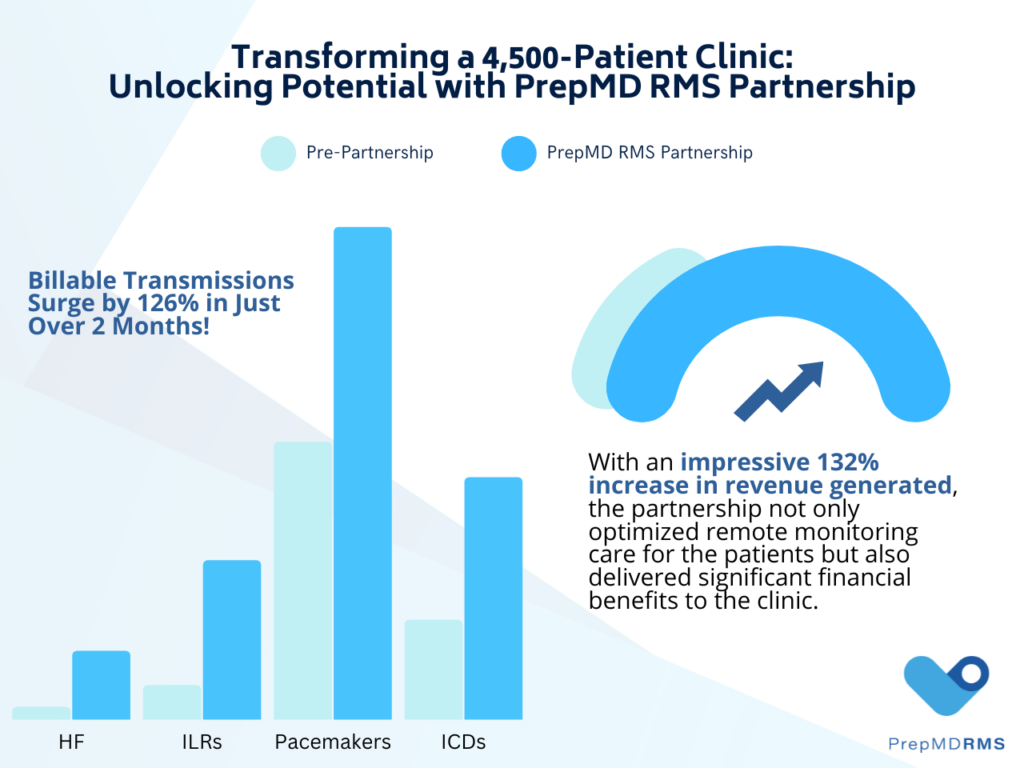
Let’s explore the impact of partnering with PrepMD on a 4,500 patient cardiology clinic to showcase the financial and clinical benefits of outsourcing remote monitoring to leading clinical solutions providers. Prior to the collaboration, the clinic faced resource constraints and struggled with a high volume of transmissions, which hindered their financial performance and remote monitoring operations. 

Over a 2-month period, the clinic observed a remarkable transformation. The number of billable transmissions increased by 126%, resulting in a significant 132% rise in generated revenue.

Here is a breakdown of the increase in billable transmissions for specific device types:

  • Heart Failure (HF): 435% increase in billable transmissions.
  • Implantable Loop Recorder (ILR): 361% increase in billable transmissions.
  • Pacemaker (PM): 77% increase in billable transmissions.
  • Implantable Cardioverter Defibrillator (ICD): 143% increase in billable transmissions.

By partnering with the PrepMD Clinic Solutions Leadership Team, the clinic achieved remarkable financial improvements. The increased billable transmissions and revenue growth during the 2-month partnership period demonstrate the effectiveness of the collaboration. The financial gains realized through this partnership highlight the positive impact of leveraging PrepMD RMS services on both the clinic’s financial performance and patient care.

Addressing Staffing and Remote Monitoring Needs:

Partnering with leading cardiac clinical solutions companies which offer bundled contract staffing and remote monitoring service offerings, enables clinics to address their staffing needs economically and effectively. Clinics can retain staff by implementing 1-year or 2-year clinical staffing agreements providing stability, overcoming high turnover rates, and reducing recruitment and training costs. Longer-term commitments foster a supportive work environment, enhance team cohesion, and optimize patient care delivery.

To address the burden of remote monitoring, clinics can partner with PrepMD for premier remote monitoring services that offer a dedicated team of full-time IBHRE-certified professionals that can seamlessly integrate into their workflows. This collaborative approach allows clinics to become self-sufficient while significantly reducing costs, optimizing billing and revenue, and delivering the highest standard of care to their patients with CIEDs.

Conclusion:

Staffing plays a crucial role in cardiac device clinics for remote monitoring, ensuring optimal patient care and streamlined operations. By adopting an innovative and paradigm shifting approach to CIED clinic management that combines outsourcing of remote monitoring services and contract staffing, clinics can achieve enhanced efficiency, financial stability, and improved patient outcomes. The expertise of specialized providers and the utilization of contract staff empower clinics to focus on direct patient care, in-person device checks, and optimizing clinic operations while maintaining the highest standards of care.

Five Phases of the Interview

Watch the video by Matt O’Neal, Co-Founder & Chairman of PrepMD here.

Five phases of the Interview: Interview preparation can be overwhelming and anxiety-producing!  Prepare, anticipate and practice are the over-arching principles to help ease the anxiety and successfully close an interview. The initial preparation for an interview involves researching the company, the industry, and the interviewer(s). You should know your key selling points that directly address why you want this job and what makes you a good fit. Prepare well for each of the five phases of an interview which are outlined in this article. Anticipate what your interviewer is looking for and specifically identify any potential concerns he or she may have about your candidacy so that you are prepared to respond to those concerns.  Be sure to practice what you will say to CLOSE the interview and role-play with someone.

Phase 1 is the Introduction and Connection phase. It is critical to make a connection with the person you are interviewing with. Use resources such as social media as a way to learn more about the person you are interviewing with. Ideally, you will be able to find some common ground. Research indicates that the longer the introduction/connection phase of the interview, the better the outcome of the interview. The rationale behind this is that people naturally feel a connection and a sense of goodwill and obligation to give that person a chance.

Phase 2 is the Review phase. “Why don’t you tell me a little bit about yourself” indicates a transition to the review phase. A common problem in this phase is the tendency to ramble on, say too much, and not feature the important facts. A lot of people may naturally present themselves and their background in chronological order. However, this may tend to take too long to get to the assets you should be featuring. Rather, you should try to frontload or feature several key things the person needs to know about you. So you could say, “before I go into the details of my background, let me give you 3 key points about myself which I think are critical to the position you are hiring for.”

Your preparation for this phase of the interview is to identify and practice introducing yourself and how you plan to explore for common ground.

You don’t need to go through every aspect of your resume. Your preparation for the review phase should be to identify and practice what you will need to say to highlight and punch up your most relevant experience and qualities.

Phase 3 is the Assessment Phase: You’ll know you are in this phase of the interview when the interviewer has started to ask more questions.  What is your best job? What is your greatest strength? What is your biggest weakness? You should try to anticipate the types of questions this hiring manager may ask you. The hiring manager wants to determine if you are appropriate for this role and for their team.

Your preparation for the Assessment phase of the interview is to take a good inventory of your objective and relevant experiences.  What is it that you objectively bring to the job?  An engineering degree with a 3.6 gpa is an example of an objective asset. Your work ethic or organizational skills are subjective. The way you can bring those skillsets to the conversation is to qualify those subjective qualities.  For example, “I achieved success in my career as a sales associate and I’ve been praised by colleagues and supervisors for my superior communication and organizational skills, along with a strong work ethic. All of these skills contributed to my successful career progression at XYZ corp.”

Phase 4 is the Job Fit Phase:  the interviewer will tell you about the job description, requirements, roles and responsibilities and overall what a day in the life of this role looks like. Hiring managers want to see that you have prepared well by researching as much as possible about the roles and responsibilities of the job. It can be tremendously helpful if you are able to speak to someone who works or previously worked in this role or a similar role, so you have some personal “day in the life” understanding. During this phase of the interview you want to take a very active listening role. Active listening involves asking reflective questions to demonstrate that you are actively listening to what they are telling you about the jobThis active listening should provide you with key points to respond to during your interview close so that you can clearly communicate what makes you a good fit for this role.

Phase 5 is the Close Phase: Telltale sign that you are nearing the end of the interview is when the interviewer asks, “Do you have any questions for me?”  Prepare questions! As you ask these questions you want to keep an inventory of the answers so that you can use them in your summation close. Categories of questions include people, team, products, services, market, and position or role.

Most people find the Close to be the most challenging and awkward part of the interview, so the general advice is to practice, practice, practice. The more you hear yourself saying a close during practice, the less anxiety you will have over executing the close during the interview. A direct closing statement example would be “Do you think I am a good fit for this role?” or “Do you have any concerns about my ability to do this role?” and be sure to meet those concerns head on. Finally, ask the interviewer “Do I have your support for this role?”  Be prepared to respond. At this point you may need to summarize your key attributes for this role and how they confront and respond to those expressed concerns. Finally, you should prepare a follow up question, “What are the next steps in the interview process and what is your expected timeline for making a decision.”  Be sure to ask the interviewers for their business cards and email addresses so you can send each person a short personalized thank you email, where you should remind them of why you are a good fit for this role and to address any concerns he/she may have about your candidacy.