Tag: Clinic Management

Team of clinicians at meeting

Determining Your Device Clinic’s Alert Management Protocols

Rob Lerman, MD, CMO and Kent Seckinger, CCDS, Customer Success Director, PrepMD Clinic Solutions Leadership Team


Management of clinical alerts is unquestionably one of the most challenging tasks for remote monitoring programs. Optimizing alerts saves staff time and focuses energy on clinically relevant issues. Customizing alerts addresses the variations in care that are seen between clinicians. Development of a clear clinical escalation policy ensures expedited communication between the care team and reduces the time between clinical event and clinical action.

Whenever a remote monitoring program is started or reviewed, it is helpful to bring all the clinical stakeholders together for a discussion about alert programming. That includes anyone from the physicians and advanced practice providers (APPs) who see escalations to the nurses and techs that may be the primary alert reviewers.  As difficult as it may be to get physicians and APPs to sit down for such a meeting, establishing their preferences up front saves a great deal of everyone’s time in the long run. It is important to go through all the manufacturers’ alerts with fresh eyes and select whether they are programmed on as a clinic default and if so to what level of urgency (red vs. yellow, etc.) If possible, it is helpful to create categories of patients based on indications and create standardized programming parameters for those patient groups. For example, patients with complete heart block should likely all have the alert for excess RV pacing turned off. A clinic may want to have one standard set of alerts programmed for primary prevention ICD patients and another for secondary prevention patients. While there will always be customization, if you can standardize the alerts as much as possible across your population, it will reduce confusion and make communication that much easier.

Patient-level customization should start at or even before implant with a conversation between the implanting physician and industry representative. Implanting physicians will often have a wealth of clinical information about the patient which will inform device programming, and device company representatives typically know the details of features and algorithms better than anyone else. An experienced device company representative will learn the programming preferences of the physicians and clinics they serve and will often quickly learn the typical alert preference programming. Nonetheless, the implanting physician should always confirm the proper programming for an individual patient, especially when it deviates from the customary.

The first clinic visit after implant is another great opportunity to check in with the clinicians on alert programming for an individual patient, especially if the follow-up staff is not the same as the implant staff. The lab or operating room is often a hectic environment and there isn’t always an opportunity for a thorough review of alert parameters at implant. The follow-up wound check may provide a better opportunity to raise questions such as whether a patient in atrial fibrillation will be a candidate for cardioversion and thus should have AF alerts programmed on or whether that patient is in permanent AF and should have those alerts turned off. Making the initial investments in time to program alerts properly pays dividends over the long term.

One issue that is often a source of variation in programming is whether to program alerts as “red” or “yellow” or other. Certainly, there are some alerts that are not programmable and default to red status for almost all manufacturers. Examples of those would be a battery at end of life or a hardware reset. Other alerts can be programmed as red or yellow, or for many Medtronic alerts, as a website only alert that will not be identified by color. For the most part, red or yellow alerts are displayed at the top of the dashboard on the manufacturers’ remote monitoring portals, so their main benefit is that they are readily identifiable as issues requiring attention. Many device nurses or techs will start their reviews by attending to the red or yellow alerts, so those designations may have a direct impact on clinical workflow. Some physicians or APPs will direct their clinical escalations based on alert color, such as “Only call me for red alerts”. Others may treat red and yellow alerts identically. While alert color is helpful, not all clinically actionable events may be identifiable by a red or yellow alert. Episodes of pace-terminated ventricular tachycardia or a single ICD shock may not always be eligible for red or yellow alert designation, depending on the manufacturer.

Many alerts offer opportunities to customize further based on parameters such as arrhythmia duration or heart rate. For example, a patient with known short bursts of paroxysmal atrial fibrillation could be programmed to alert only if an episode lasted for a prolonged period of time or if the AF burden met certain criteria. Likewise, a patient with permanent AF with controlled ventricular response could be programmed to alert only if the ventricular rate exceeded a certain value and a patient with known brief sinus pauses could be programmed to alert only for prolonged pauses. This contrasts with for example, a patient with a history of cryptogenic stroke for whom you may want to be alerted for any episode of AF that might identify the need for anti-coagulation. Customization of alerts in this manner goes a long way towards increasing the odds that an alert will be actionable. It is important that members of the care team who are adjusting alerts have access to important clinical information such as anti-coagulation status which may change over time.

Many implantable cardiovascular monitors, or implantable loop recorders (ILRs), are seeking to decrease the large burden of non-actionable alerts by offering indication specific programming as a “bundle”. For example, a patient with suspected ventricular tachycardia may have the “Tachy” parameter programmed on as a red alert but the “AF” parameter off altogether. Often clinics will program alerts broadly “On” at implant but aggressively narrow the alert parameters as time goes on.

Regardless of the best intent, some false positive alerts are inevitable. ILRs are probably the most common culprits because of the nature of the device. Given that they are not intracardiac but subcutaneous their signals are subject to more external disruption and noise than intracardiac leads. Additionally, since like surface leads they have combined atrial and ventricular electrograms, sophisticated algorithms to differentiate atrial from ventricular arrhythmias based on A-V relationships are often unavailable. Of course, even pacemakers and ICDs often have trouble differentiating atrial from ventricular tachycardia and may generate false positive alerts. Programming around these can be quite difficult. The programming of ILRs is often more “liberal” with respect to arrhythmia identification, because as diagnostic-only devices they cannot treat the arrhythmias that occur, raising the importance of identifying rhythm abnormalities (such as long pauses or tachyarrhythmias) so that they can be treated before adverse events occur. Some physicians are less interested in being alerted for events that the device has treated, such as a single ICD shock.

Minimizing false positive alerts decreases alert fatigue amongst clinicians, but even when this isn’t possible, the primary alert reviewer needs to remain vigilant and at least briefly review every alert. A true-life example where this played out was a woman in her mid-20s with an ILR who transmitted over 100 false positive alerts for sinus tachycardia before she had an episode of true ventricular tachycardia at over 200 bpm. Many ILRs now allow reprogramming remotely which would have allowed us to filter out the sinus tachycardia during her daily workouts, but even when that is unsuccessful it is important to review all data, even though it can be frustrating at times.

Different physicians may have very different attitudes about what kind of arrhythmias are important, especially when considering therapy such as catheter ablation. Whereas one cardiologist may not be interested in asymptomatic episodes of ventricular tachycardia below the rate cut-off of an ICD, others are more aggressive about ablation of complex arrhythmias and may want to be aware of those same arrhythmias. Similar philosophical differences apply to atrial arrhythmias, so again communication between physicians and the primary event reviewers is paramount. In organizations with multiple physicians, it is often helpful to have a physician champion for the remote monitoring program who can often drive at least some level of standardization of alert criteria.

The final, and in some ways, the most important piece of the alert management puzzle is development and operation of a coordinated cohesive clinical escalation policy. The escalation policy determines how clinical information gets turned into clinical action. Once the primary reviewer, be it a clinic nurse or tech or a third-party remote monitoring specialist, determines that an alert or event is real, what do they do with that information? What types of events should generate a report? What types of events require escalation to another member of the care team and how should that information be conveyed? Is a note in the EHR sufficient or does it warrant a phone call or text message? To which member of the care team does the message go? Does the physician ever want to be interrupted in clinic or in the lab and if so, for what? Are there specific clinical scenarios which merit that a patient should call 911 or go to the emergency department? Are there others when scheduling a clinic visit is more appropriate?

Clear delineation and documentation of the clinical escalation policy reduces stress for the care team and ensures that urgent situations get addressed quickly and that no one is interrupted with unnecessary calls or messages. Typical issues that might be addressed include episodes of atrial fibrillation- how long or fast do they need to be in order to be escalated? How is an anticoagulated patient handled differently from one who isn’t anticoagulated? How about episodes of nonsustained ventricular tachycardia in both ICD and pacemaker patients? How long does a pause in an ILR patient need to be to require urgent attention? Don’t forget to address both normal working hours as well as nights, weekends, and holidays when the entire team is not available. An upfront investment of a little time to define escalation policies improves patient care and goes a long way towards avoiding awkward and sometimes unpleasant conversations.  

Clinical escalations should always be documented, whether in the EHR, remote monitoring software platform, or elsewhere and the escalation protocols should be a living document that is periodically reviewed. Emerging clinical data, changes in clinician staff, or improvements in clinical operations are just a few of the reasons that protocols may need to be changed. At minimum, an annual stakeholder review improves the chances that everyone is staying on the same page.

Data deluge and alert fatigue are some of the principal barriers to adoption of remote monitoring for CIEDs. Careful attention to alert management can minimize false positive alerts and keep the focus on moving from clinical event to clinical action. Standardizing alert parameters as much as possible by device type and patient indication can simplify clinical workflows, but customization of alerts for individual patients further refines the data that needs review. Developing clear clinical escalation policies improves efficiency and patient care, while minimizing unnecessary distractions.

Questions about this article should be directed to the PrepMD Device Clinic Solutions Leadership Team.

Black clinician in hospital corridor

Cardiac Device Clinic Workflow Improvements: Recommendations from Experts in Remote Monitoring

It certainly is an understatement to say that running an effective and efficient cardiac device remote monitoring clinic is a challenge. Any clinic manager who is evaluating an existing remote monitoring program for improvements or who is launching a new remote monitoring program must dedicate time to analyze their clinic’s current staff, workflow, and capabilities against what is needed. This will help anticipate and stave off many of the most common challenges faced by device clinics – problems such as staff burn-out, unscheduled patients and incorrect billing. 

Every clinic has a unique workflow, complications, and issues when it comes to running a cardiac device remote monitoring program. Clinics receive tremendously large amounts of device transmission clinical data coming in daily. Many clinics do not realize the value of remote monitoring and operate without a dedicated remote monitoring staff. Clinic managers may underestimate the amount of hidden workflow involved in remote monitoring which causes many pain points for staff struggling through the heavy workflow. Many clinics struggle with the standardization of an alert protocol and alert criteria. There is certainly a prevalence and frequent misunderstanding of the value and requirements of remote monitoring which commonly leads to ineffectively managed remote monitoring programs.  

“Unfortunately, there is a lack of a unified approach to remote monitoring across the entire cardiac device remote monitoring space. This leads to confusion of what is needed to run a device remote monitoring program. There is an unfortunate tendency where this type of remote care can lead to a devaluing of the work being performed, simply because there is not a face-to-face patient interaction taking place, the value of the clinical care should not be minimized.” Jess Rizzo, CCDS, PrepMD Clinical Operations Director
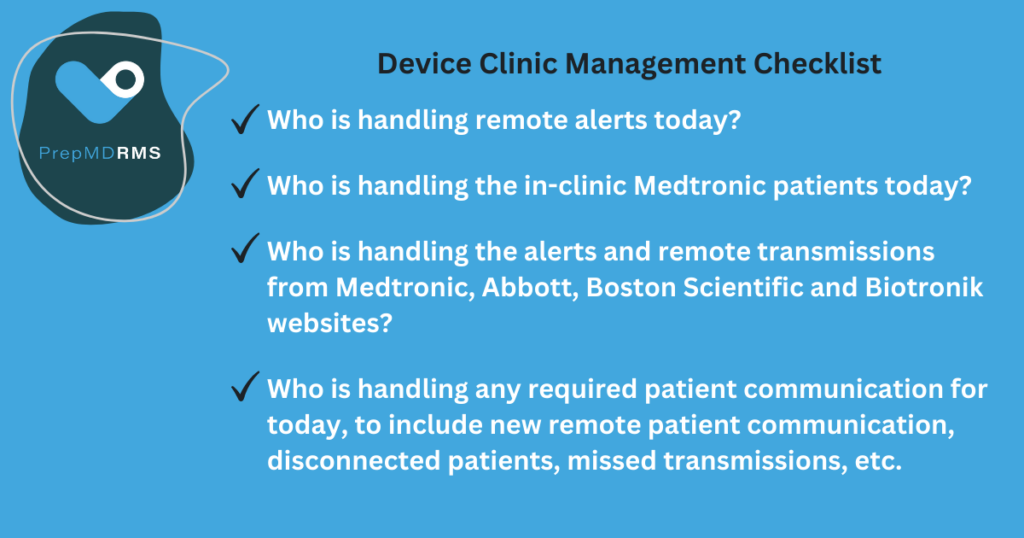
Without an established Remote Monitoring Process in place, How are these questions answered each day?

“it’s important to remember that all of these device clinic remote monitoring tasks are essential, including the variable and hidden tasks that are difficult to quantify. In fact, not recognizing them can certainly lead to a loss of revenue, missed clinical needs, and that overburdening burnout feeling that many clinicians feel.” 

Clinical Workflow: Who, What and How?

In order for a remote monitoring program to run effectively and efficiently the following must be clearly delineated: the tasks (what), the who (which clinic staff is doing each task) and how (training needed, communication, and timeline/processes for all tasks) must be clearly delineated to ensure quality. 

Big Picture Questions to Analyze a Cardiac Device Remote Monitoring Program 

  • What: What are the required tasks for a best-in-class remote monitoring program? 
  • Who: Who on the clinic’s staff is best suited to handle each of these required tasks?  What training is required?
  • How: How will these individuals accomplish the required tasks? What is the overall process and what are each individual contributor’s roles and expectations? What quality measures need to be in place?

Beyond the big picture questions, there are many more questions and details that go into implementing and improving a device remote monitoring program. Each clinic handles things differently, so who is responsible for all the tasks of remote monitoring is extremely variable for each clinic. Efficient handling of remote monitoring is possible, but only with the proper staff and workflow. It is infinitely difficult to quantify all of the tasks of remote monitoring because the same task might take 30 minutes one day and three hours the next. A relevant time and workflow study published in JMIR Cardio 1, “Clinic Time Required for Remote and In-Person Management of Patients With Cardiac Devices: Time and Motion Workflow Evaluation” is a persuasive argument for the efficiencies of remote monitoring. However, this study certainly does NOT take into account all the intricacies and requirements regarding remote monitoring workflow, tasks, training and more.

  • Staffing: Who is/are the right individual(s) on the staff for each of the required tasks? Is it feasible for one  or two individuals or is a dedicated team required for certain tasks?
  • Monitoring of the device company websites: adding, deleting, or transferring patients clinic to clinic. It takes time to go through each of the manufacturer’s websites plus clinic sites.
  • Report Triage: So here is where you’re deciding basically the seriousness of each report. You’re checking to see if the alerts are actionable. You’re checking to see if that patient initiated is actionable. It can include alerts or concerns within the scheduled reports. This also includes making sure those actionable reports or alerts are brought to the proper clinical staff, whether that be to a PA or a physician. 
  • Report Construction: What are the tasks and process needed to complete even just one remote report? This includes everything from data download, clinical write-up, report sign-off, and billing. This also consists of which includes alerts and patient-initiated transmissions. This task will look very different depending on the clinic’s software. It is also important to remember that there is an element of triage here with many alerts found within scheduled transmissions. In these situations, the clinic staff needs to determine if they’re actionable or not actionable, brought to the proper staff, in addition the writing that scheduled report. The person writing the remote report must take patient history into consideration and make appropriate recommendations for clinical care. 
  • Charting/Documentation: The documentation includes moving that report in an organized and accurate manner into the electronic health record, ensuring proper documentation of the report and any follow-up actions needed. 
  • Patient Communication: Each clinic is unique regarding the type of communication done with the patient to inform them of the remote report and this can be done by mail, phone or through a patient portal. If there was something on the remote that is serious enough the patient may need to be seen in clinic. This requires a phone call to the patient to ask about any symptoms they’re having and make a determination to have the patient seen in clinic.
  • Billing: Attention to detail for accurate billing is a challenge. Is the coding/billing accurate, based on the type of report? Is it a scheduled transmission or is it an alert transmission? 
  • Scheduling Patient Follow Up: Is the next visit an in-office or a remote follow-up? This may be as simple as confirming that the schedule is correct on the websites or within the EHR. 
  • Final Documentation and Sign-Off: The next step is about documentation which includes ensuring the report is kept in  the proper place in patient records, as well as getting the final sign off with clinic staff. 
  • Patient Education: This includes initial and ongoing communication to ensure that the patient understands the value and functionality of remote monitoring. This includes instructions that clearly communicate the need for the patient to plug in and keep the monitor connected and explain how it transmits important clinical data as part of their overall care program.
  • Transmission Connectivity and Troubleshooting: This is the task of identifying who is not transmitting data and troubleshooting with those patients in order to help get them transmitting again. It is important to focus on not only getting patients reconnected, but ensuring they are properly connected and transmitting moving forward.
  • Quality: Who is responsible for checking up on quality metrics on report writing, patient communication, connectivity, billing, and how often are these quality checks performed?

Is a Dedicated Remote Monitoring Clinical Staff Required?

Some clinics are set up to have remote monitoring responsibilities assigned as fill-in-work when the clinic staff have availability during their downtime. This can lead to inefficiencies and cause a tremendous amount of confusion about billing practices, and a valuable loss in revenue. 

“We see some clinics with two different mindsets when it comes to remote monitoring: Full-time and dedicated staff versus staff handling on as time-allows basis. Having Clinic staff dedicated to remotes results in a far more efficient and effective remote monitoring program. The clinics without a dedicated staff for remotes are truly at a disadvantage – far more likely to experience an overburdened staff, missed billing opportunities and quality issues.”

Who should be tasked with taking on these important roles and responsibilities to run an effective cardiac device remote monitoring program? Each clinic is unique and must determine who should fill these roles and what roles are even needed. 

  • Administrative Staff: An administrative role can take on so many non-clinical tasks and provide tremendous help and structure to a remote monitoring program. Our team here at PrepMD finds this role to be absolutely indispensable. The administrative staff can help with so many steps to include scheduling, billing, patient communication and connectivity issues, adding, deleting, and transferring of patients on the websites. This frees up the clinical staff for patient care requirements and can certainly help with overburdening and burnout of all staff.
  • Report Writer: The Report Writer is the clinically trained person who is the primary writer of the device patients’ remote report. This person is carrying out the monitoring of all of the websites. This person should be triaging the downloads, constructing the reports, and communicating with other clinical (secondary reviewer) and administrative staff on next steps. Most often this role is filled by an allied professional (Cardiac Device Specialist) who often holds an IBHRE® certification (CCDS and CDRMS). Some clinics choose to outsource this triaging and/or report-writing to a 3rd party vendor remote monitoring service provider. 
  • Secondary Report Reviewer: Typically, the secondary report reviewer oversees and supervisors the primary report writer. Depending on the clinic, this role may be filled by an experienced cardiac device technician, a nurse, a mid-level, even a physician. This person is responsible for carrying out the recommendations for patient management, while considering the patient history, patient medications, previous indications on the remote reports, and the review of the current data and report. This individual reviews, assesses and makes recommendations for further care management. 
  • Final Report Reviewer: Depending on the clinic, sometimes the final report reviewer is a physician or physician’s assistant who review the final interpretations and signs off on the report. 

There are many complexities to running a quality cardiac device remote monitoring program, resulting in frequent burnout, and overburdening of clinic staff. This can and should be avoided if a clinic takes the time to have a clearly defined process, trained staff and reasonable expectations and allowances to ensure each person responsible is capable of completing tasks with quality, competence, and efficiency.  

Sources:
1 Boriani, Giuseppe and von Wagner, Boriani, “Clinic Time Required for Remote and In-Person Management of Patients With Cardiac Devices: Time and Motion Workflow Evaluation, ” NIH, JMIR Cardio, 2021 Jul-Dec; 5(2): e27720, https://www.ncbi.nlm.nih.gov/pmc/articles/PMC8556635/

Female black clinician thumbs up

Best Practices for Running a Cardiac Device Clinic

At a recent PrepMD Webinar a panel discussion was held to share best practices to address the common challenges on cardiac device remote monitoring programs. The panel discussion was led by Rob Lerman, MD, CMO, along with three CCDS-certificated leaders from the PrepMD Clinic Solutions Leadership Team.

Kent Seckinger, CCDS, PrepMD 4+years, cardiac device space for 20 years, working split half between the device industry for manufacturers and the other half working for a large device clinic.

Brianne Terrell, RN, CCDS, PrepMD 1 year, device clinic for about 10 years working in support of device implantation, patient consultation, perioperative device management, in-clinic follow up, and remote monitoring. 

Janet Cedric, CCDS, worked at Prepmd 4.5+ years and in the cardiac space for about 24 years. I’ve managed and started up device clinics. 

Q: Based on your years working in cardiac device clinics, can you share any advice or tips on how clinics handle the staffing requirements needed to run their remote monitoring programs? 

Brianne: I worked in a clinic of all registered nurses and our responsibilities made for very fragmented days.  We were all responsible for seeing device clinic patients in person and handling remote monitoring patients. Obviously, the patients seen in person seemed to always get the most priority. During and after COVID, we ended up having to send many of our nurses to work from home and what we found was we were able to work more efficiently when we had dedicated staff for remote monitoring. So it was really one of those aha moments.

Janet:  I’ve been fortunate enough that the clinics that I worked in had dedicated staff who were well-trained and supported, so they were all very capable of being able to recognize and manage the complex issues of cardiac devices and remote monitoring. Some clinics I’ve been in touch with decided that due to COVID staff changes and shortages they needed to move to a third party vendor to manage their remote monitoring.

Kent: As a clinic increases in patient size, so do the remote transmissions and there comes a balancing point where a limited staff, or in some cases one individual, is responsible for in-person and remote care of device patients. Having a dedicated staff for remote monitoring clearly helps as a clinic grows in size and allows the clinic to manage and improve efficiencies. The best situation to start to improve a device clinic is to be able to have that right mix of in-clinic staff versus dedicated remote staff.

Q: What would you say most clinics feel are the biggest challenges faced with running an effective and efficient remote monitoring program?

Kent: Many of the biggest efficiencies any clinic should achieve is centered around patient education. Too often a patient is sent home after device implantation with a transmitter without any education around the device, the transmitter and the importance of remote monitoring. Spending some dedicated time at the first post-op follow up visit which can take a good 30- 40 minutes is crucial.  Taking time to educate the patient and the family is so crucial. This patient communication and education should clearly explain the benefits of remote monitoring and how this will ultimately make the patient’s life safer and easier by reducing unnecessary in-office visits and hospitalizations. It also helps to explain the billing associated with remote monitoring so they are not surprised or confused. This patient communication will help reduce a lot of that hidden workload and burden on the clinic staff, including unnecessary patient-initiated transmissions or connectivity issues.

Brianne: I find that looking back 10 years ago versus today the remote monitoring population and requirements of any clinic has just exploded and these clinics are feeling the pressure of managing it all. It’s rare that we talk to a clinic that does not feel the need to have more hands on deck to manage their remote monitoring. I would say the biggest challenge most clinics face is the huge remote monitoring workload burden and figuring out the best workflow for their individual clinic.

Janet: I’d say the biggest challenge remote monitoring clinics face is not having the appropriate dedicated staff. We see a lot of benefit from clinics hiring dedicated administrative staff to help with remote monitoring. Especially when the software is integrated with EMR, there are a lot of backend tasks that can be crucial to making things more efficient. There are many times when the remote monitoring staff will need to talk to the in-clinic staff. If you have a dedicated staff for remote monitoring they will be able to identify any patient care problems earlier and get that patient into be seen by a clinician sooner and ultimately providing improved patient care.

Q:Based on your experience, do you have some advice or tips that you can recommend to those trying to start up or improve their remote monitoring program? 

Brianne: The value of a dedicated staff for remote monitoring cannot be underestimated, in addition to the importance of a thorough communication process to educate patients about remote monitoring and ensure their monitors are connected and transmitting.

Kent: If you really want to reduce your clinic workload, it’s really coming down to educating that patient from the start. The result will be fewer patients with disconnected monitors and fewer calls from disgruntled patients who don’t understand the remote monitoring billing. This patient communication is a really crucial step and sets the stage to reduce a lot of that overload, which allows clinics to operate at a much higher efficiency level.

If you are a clinic manager with questions or need help with the management of your cardiac device remote monitoring responsibilities, contact the PrepMD Clinic Solutions Leadership Team.

Clinician in dark blue scrubs at computer

Cardiac Device Remote Transmission Scheduling: Work Smart, Not Hard

“Setting correct intervals, whether manual or automatic scheduling, in Boston Scientific, Medtronic Carelink, and St. Jude/Merlin/Abbott patient profiles can serve as a resource when determining the best dates for upcoming office visit device checks.”

by Amy Harris, PrepMD Lead Patient Outreach Specialist

Amy is part of the PrepMD Clinic Solutions Leadership Team, providing cardiac device remote monitoring software and services to device clinics across the U.S.

Auto-schedules, set to the correct intervals, reduce the risk of scheduling oversight, as well as billing inconsistencies for patients keeping track of their medical balances. 

In addition to billing predictability for patients, scheduling pacemaker and defibrillator remote transmissions at the standard minimum interval of 91 days increases the likelihood of obtaining four remotes per year, per patient.    

Setting intervals to 98 days to allot more time to initiate the billing process results in fewer transmissions each year per patient, and reduces clinic revenue for remote monitoring.

The same result is true for remote schedules which are skipped or “pushed out” for office visit interrogations. Setting correct intervals, whether manual or automatic scheduling, in Boston Scientific, Medtronic Carelink, and St. Jude/Merlin/Abbott patient profiles can serve as a resource when determining the best dates for upcoming office visit device checks. 

Scheduling loop recorder/ICM transmissions each 31 days is the standard minimum, however, intervals of 35 days ensure transmissions arrive on weekdays (for clinics wishing to avoid weekend billing). 

 Medtronic and Boston Scientific require a few
unique steps during the scheduling process

Patient accounts in Carelink with bedside monitors and implanted devices compatible with Smart Scheduling are represented by a symbol . This icon indicates the implanted device is capable of automatic, cycling scheduled transmissions.

The absence of this icon is noted for devices which require patient-initiated manual transmissions, such as with the Advisa, Adapta, Micra, Sensia, Revo, and Versa. 

For Medtronic Carelink, there are different scheduling options and requirements  

Single 

  • Located under the “Schedule” tab, these one-time schedules are used primarily for pacemakers or defibrillators programmed only to manually transmit. Patients are informed of future transmission date(s), and send data independently. 
  • Single, or one-time scheduling may also be utilized for any pacemaker or defibrillator which is capable of Smart Scheduling, but is opted out of automatically recurring transmissions (e.g., Monitoring physician preference, or report data/billing concerns). 
  • In some cases, both Single and Smart schedules can be used, however, it is more efficient to select one option to avoid scheduling overlap or error. 

Series

  • Located under the “Schedule” tab, compatible pacemakers or defibrillators can utilize a Series, or auto-cycled schedule. This method ensures home monitor transmissions are being sent on time, every time, and provides notification when they have failed.
  • The earliest possible transmission date is provided, and custom intervals can be selected.     
  • If a bedside monitor experiences connectivity issues, a Series set to transmit on an interval will automatically place that patient within the “Missed Transmissions”, “No Schedules”, and/or “Disconnected Monitors” category for your review. 

Summary (Loop Recorders)

  • Located under the “Overview” tab, “Summary Reports” are clinical reports generated for LINQ devices. These can be set to a one-time or recurring schedule. 
  • LINQ schedules should not be set under the “Schedule” tab. Whether one-time, or recurring transmissions, a Summary Report cannot be generated unless set up utilizing the tools provided under “Overview”  
  • Note: LINQ schedules created under “Overview”, do not populate the date of the next transmission under the dashboard column labeled, “Next Scheduled Send” (for defibrillators and pacemakers). It instead will read, “Not scheduled”. 

Boston Scientific provides a link at the top right of each dashboard to toggle between “Clarity” for loop recorders, and “NXT” for defibrillator and pacemaker device transmissions.     

Scheduling in Boston Scientific Latitude NXT 

For pacemakers or defibrillators, within each patient profile is an option to “Edit/View Schedule and Alert Configuration”. 

For Latitude NXT, there are different scheduling options and requirements  

  • Schedules can be set as a clinic default (managed in clinic settings)
  • Or customized with automatically recurring intervals 
  • Select the next scheduled remote follow up date in blue to view the calendar, and ensure the weekday is matched with the “Day of the Week” dropdown. 
  • NXT provides the option to change or set remote transmission schedules either directly from the dashboard, or within “Schedule and Alert Configuration”. 

If electing to set or edit the next transmision date on the dashboard, the date must fall on the same weekday specified under “Schedule and Alert Configuration”, or else the transmission may be “missed” as a result of the date contradiction.

As a method of efficiency, all schedule editing should be carried out under “Schedule and Alert Configuration”

Scheduling in Clarity

Access Clarity using the top right toggle link 

  • Select patient to view profile. 
  • The next scheduled date can be selected from the calendar without an associated weekday dropdown.  
Clinician educating cardiac patient

The Leadless Pacemaker Technology Space: The Move Away From Transvenous Leads

Keep an eye on the leadless pacemaker technology space and watch for upcoming clinical trial data to determine best options for your clinic and patients.”

by Mark Matechik, MS, CCDS, PrepMD Account LeadMark is one of the experts on the PrepMD Clinic Solutions Leadership Team, helping providing excellent patient care through their CIED remote monitoring software and services

Most vendors are now offering some form of leadless pacemaker technology, be it a single lead that includes ventricular pacing and atrial sensing, leadless pacemakers, or ICDs with subcutaneous leads. Citing decreased complication rates and easier or fewer extractions, most of the EP world is now getting on board. 

As new products continue to hit the market, it’s good to take a step back and look at the data and evidence supporting the use of these novel devices. 

Medtronic was the first to release a truly leadless pacemaker in the Micra VR device, released in 2015. Delivered via femoral catheter, there was no need for transvenous leads or a pacemaker pocket. Early data from the IDE (Investigational Device Exemption) and PAR (Post-Approval Registry) studies showed excellent results that met study endpoints. More recently, the Micra excelled in a comparison study looking at large patient populations in real world settings compared to the IDE data (El-Chami et. al, 2018). Successful implantation was achieved in 99.1% of patients with a 2.1% major complication rate over 12 months (95% CI, 2.0%-3.7%), 63% less than patients with transvenous devices (p<0.001). 

Also on the market is the Micra AV, which boasts VDD pacing and the ability to provide AV synchrony. The MARVEL 2 trial (Clemens et. al, 2020) showed that with VDD mode and accelerometer-based atrial sensing, the proportion of patients with >/=70% AV synchrony at rest was significantly greater than the proportion of patients in VVI 50 mode (89.2% vs. 26.8%, p<0.001). There were no pauses or oversensing-induced tachycardia. The sample size was quite low at n=75 and only evaluated AV synchrony at rest,, so while the results may not be representative of real-world situations, they are at the very least promising and something to watch closely.

While MDT builds its atrial sensing algorithm, Abbott has recently launched a leadless device as well. Following results of the LEADLESS II IDE study (Reddy et. al, 2022), the Aveir VR system is now FDA approved for implant. Successfully implanted in 98% of patients and able to electrically map before deploying, the Aveir system should serve as a good competitor to the Micra family of devices. What’s more, Abbott recently implanted the first true dual chamber leadless pacemaker in February of this year as part of the Aveir DR i2i study. Contrasting Medtronic’s approach of including atrial sensing in one device, Abbott’s Aveir DR is actually two separate implants, one in the ventricle and one in the atrium. The study has a goal of enrolling 550 patients with primary endpoints focusing on the DR system as a whole (complication rates, acceptable thresholds, etc). Secondary endpoints will look more closely at the atrial implant individually. Primary results are expected November 2023 and study completion is slated for November 2025.

Boston Scientific is taking the leadless trend in an entirely different direction. With the S-ICD successfully on the market for years, Boston Scientific is currently enrolling in the MODULAR ATP trial which involves an EMBLEM S-ICD system implanted concurrently with the EMPOWER MPS (Modular Pacing System) leadless pacemaker. One of the most significant critiques of the S-ICD is that patients who develop a need for transvenous pacing after implant will require an entirely new system. Assuming the Empower makes it to market, a physician can add the Empower leadless device to the already existing S-ICD system with no transvenous leads necessary. Furthermore, a combined mCRM system (S-ICD defibrillator and Empower leadless pacemaker) can provide ATP for fast, organized rhythms in an attempt to convert without the need for a shock. Modular ATP is sponsored by Boston Scientific and will look at primary endpoints of complication rates, communication success between devices, and adequate capture thresholds. Secondary endpoints will examine the Empower’s rate sensor and all-cause survival. If successful, this system will be the first to provide pacing and defibrillation without the use of transvenous leads. 

It is truly amazing to see the increased options for patients with pacing considerations even over the last couple of years. We’re no longer tied to traditional RV apical pacing systems. Leadless pacemakers are becoming increasingly popular as a primary pacing option, or especially in patients with limited vascular access, occlusions, or infections. Keep an eye on this space and upcoming trial data to determine what the best option is for you, your clinics, or your patients.

For additional information visit these reference websites:

https://pubmed.ncbi.nlm.nih.gov/30103071/

https://pubmed.ncbi.nlm.nih.gov/31709982/

https://www.jacc.org/doi/full/10.1016/j.jacep.2021.11.002

https://clinicaltrials.gov/ct2/show/NCT05252702

https://clinicaltrials.gov/ct2/show/NCT04798768

Med Device Careers Remote Monitoring Podcast

The Future of Patient Care: A Podcast interview with Beth Davenport, MSN, RN, CNML, and Amy Tucker, BSN, RN, CCDS of Sanger Heart & Vascular Institute

In this podcast episode, we speak with Beth Davenport, MSN, RN, CNML, and Amy Tucker, BSN, RN, CCDS of Sanger Heart & Vascular Institute in Charlotte, North Carolina, U.S. Beth serves as the Clinical Director of Virtual Care and Cardiac Device Clinics, and Amy is an Advanced Cardiac Device Nurse in their cardiac rhythm device clinic and remote monitoring center. In this conversation, we speak about the success they’ve had at Sanger developing a best-in-class remote monitoring program, the role of the AHP, and the future of collaboration between clinicians, industry, and hospital administration with the creation of HRX, an immersive digital health conference. Sanger Heart & Vascular Institute is a nationally-recognized, top-rated heart and vascular program, where for over 50 years more than 100 heart experts have delivered lifesaving care for every kind of heart and vascular condition.

Visit Med Device Careers Podcasts, brought to you by PrepMD, for more conversations with industry experts across the medical device industry.